
Accepting in-salon payments just got simpler. With the Treatwell card machine, you can take secure card and contactless payments directly through Treatwell Connect.
Are you more interested in using Tap to Pay? Take a look at this article to find out everything about it.
What you’ll find in this article
What is the Treatwell Pay card machine and what are its benefits?
How do I know my payments are safe with my Treatwell card machine?
Which cards and wallets can I accept with my Treatwell card machine?
Is there a minimum amount required for card payments on my Treatwell card machine?
What are the technical specifications of my Treatwell card machine?
What is the Treatwell Pay card machine and what are its benefits?
The Treatwell Pay card machine is a Wi-Fi-connected handheld touchscreen device that works seamlessly with Treatwell Connect to accept swipe, chip, and tap payments anywhere in your salon. If you are based in the UK and using the S710 model, 4G connectivity is also available as a paid eSIM add-on.
But please keep in mind that even though the device includes a SIM slot, third party SIM cards are not supported. It makes taking payments simpler and more professional, since transactions are processed automatically, reducing errors and admin. The pricing is the same for all card types, payments appear directly in your reports, and the machine is easy to use, reliable, and fully mobile throughout your salon.
How much does my Treatwell card machine cost?
Below you can find information on pricing:
Ireland pricing here.
Germany pricing here.
Austria pricing here.
Switzerland pricing here.
Belgium pricing here.
Spain pricing here.
Italy pricing here.
How can I request a Treatwell card machine?
If you are based in the UK, you can request your card machine directly through Treatwell Connect by clicking Treatwell Pay > Get Treatwell Pay). Check this article for more information.
If you are based elsewhere, you can request your card machine directly through Treatwell Connect (click Settings > Finances > Treatwell Pay)
Alternatively, drop us a message using the 'Chat Support' button, and we'll help set you up.
A member of our team will then follow up with you directly.
All new orders will receive our latest white card machine. The classic black card machine is no longer available for purchase, though existing devices already in use remain fully supported.
How do I know my payments are safe with my Treatwell card machine?
Payments are powered by Stripe, one of the world’s leading payment providers. Every transaction is securely encrypted and processed through Stripe’s trusted infrastructure, so both your business and your clients are protected.
How often will I get paid from my Treatwell card machine?
You can choose to receive payouts daily, weekly, or bi-weekly (bi-weekly is the default) with no extra charge.
You can check or update your bank details in Treatwell Connect by going to Settings > Finance > Bank details.
To update your payout frequency:
Go to Settings > Finance > Payout schedule in Treatwell Connect.
For information about when your first payout will arrive, please check the relevant payout guidance or contact Support.
Which cards and wallets can I accept with my Treatwell card machine?
You can accept payments by smartphone, physical card, or smartwatch.
Cards: Visa, Mastercard, American Express, Discover, Maestro, Girocard, Eftpos, Interac, China Union Pay, JCB.
Digital wallets: Apple Pay and Google Pay.
These are the same methods supported for Tap to Pay. For more information, see this article.
How do I set up my Treatwell card machine?
If you are based in the UK, your can follow your order through Connect under Treatwell Pay. Your device will arrive already paired with your venus, so you will not need to follow the following manuel steps. For more information, check this article.
If you are based elsewhere, your device is shipped for free and usually arrives within 2–5 business days. You’ll receive a Track & Trace link and setup instructions by email or in the device box.
Installation time: Up to 20 minutes (including updates)
Recurring updates: Up to 10 minutes
For the white Card Machine:
Unbox and charge using the USB-C port on the top left. The light turns green when full.
Turn on, select language/country, and connect to Wi-Fi.
Adjust volume using the middle buttons on the right.
Wait for initial updates to complete.
If your card machine shows a 3-word code on its screen, pair it in Connect: go to Settings > Finance > Card machines, type the code and press Pair reader. Connect confirms with “Card machine paired” and the machine restarts by itself. If the machine goes straight to the ready screen, it’s already paired and you can start taking payments. If no code is showing and the machine isn’t ready, generate a new one on the machine: swipe from left to right, tap Settings, enter PIN 07139 and tap Generate pairing code.
For the black Card Machine:
(No longer available to purchase, but fully supported if you already have this model)
Unbox and insert the battery by removing the back cover.
Charge using the port on the top right.
Turn on, select language/country, and connect to Wi-Fi.
Wait for initial updates to complete.
We recommend turning the card machine on each morning, so updates can run automatically.
If your card machine shows a 3-word code on its screen, pair it in Connect: go to Settings > Finance > Card machines, type the code and press Pair reader. Connect confirms with “Card machine paired” and the machine restarts by itself. If the machine goes straight to the ready screen, it’s already paired and you can start taking payments. If no code is showing and the machine isn’t ready, generate a new one on the machine: swipe from left to right, tap Settings, enter PIN 07139 and tap Generate pairing code.
How do I pair my card machine with Treatwell Connect?
Pairing your card machine connects it to your Treatwell venue so you can start taking payments. You can do this directly in Treatwell Connect on the web, without needing to contact us in most cases.
1. Switch on your card machine
Switch on your card machine and connect it to Wi-Fi. The screen should show a 3-word pairing code.
If no code appears, swipe in from the left of the screen to open Settings, enter PIN 07139, and choose Generate pairing code. A new code will appear on the screen.
2. Open Treatwell Connect on the web
Log in to Treatwell Connect using a web browser, rather than the app. Go to Settings (the gear icon in the top-right corner) > Finance > Settings tab > Card machines. You’ll find this section at the bottom of the page.
You’ll need permission to manage POS and view finance data to access the Card machines section. If you can’t see it, check your permissions with your venue administrator.
3. Enter your pairing code
Type the 3-word code shown on your card machine into the Registration code field and press Pair reader.
When you see “Card machine paired”, the pairing is complete. Your machine will restart by itself and will then be ready to take payments.
What if pairing doesn't work?
If you see an error message, here’s what to do:
“That code isn't valid”: Generate a new pairing code on your card machine and try again.
“This machine is already paired to your venue”: Your machine is already paired, so there’s nothing else you need to do.
“Set up in-store payments before pairing a card machine”: Contact Support, as this needs to be set up by our team first.
“We couldn't pair the machine”: Try pairing once more. If it still doesn't work, contact Support for help.
How do I check out with my card machine?
Taking a payment with your card machine is simple:
1. Click on an appointment in your Treatwell Connect calendar.
2. Select ‘Checkout’. The checkout screen will open with all the appointment details.
3. Choose 'card machine'. Your card machine will connect automatically.
4. Your client pays, and you're done!
Can I use my Treatwell card machine without Wi-Fi?
Yes. You can connect it to your mobile hotspot (the white card machine also has 4G capability). If you prefer, you can use Tap to Pay instead.
To check out an appointment with the card machine:
Click on an appointment in your Treatwell Connect calendar.
Select ‘Checkout': The checkout screen will open with all details.
Choose 'card machine': It automatically connects with your device.
Clients pay. Done!
Is there a minimum amount required for card payments on my Treatwell card machine?
There is a £0.30 minimum charge.
What are the technical specifications of my Treatwell card machine?
The technical specifications of your Treatwell card machine vary depending on the card machine type.
For the white card machine:
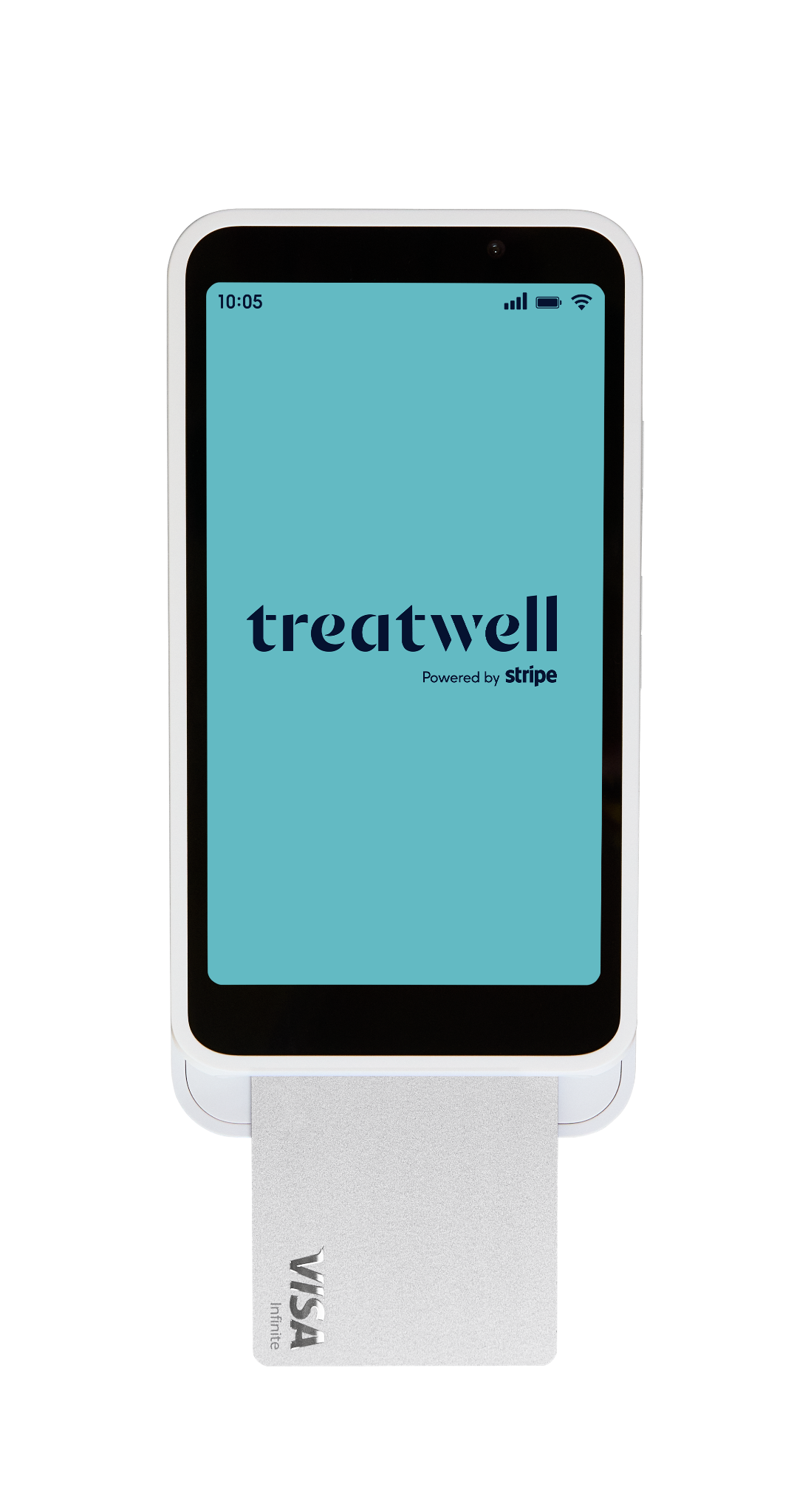
5.5 inch touchscreen
Battery lasts up to 15 hours
Dimensions: 161.9 x 81.6 x 21.4 mm
Weight: 318 gr
For the black card machine (no longer for sale; however, in circulation):
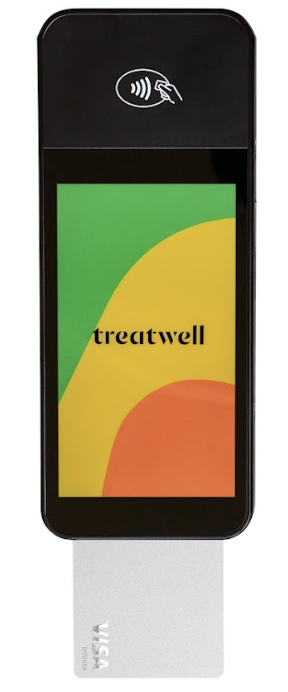
Works as a countertop or handheld device
5-inch touchscreen
Wi-Fi connected
Battery lasts up to 12 hours
Dimensions: 188.6 × 76.2 × 32.7 mm
Weight: 318 g
Charging cable and adapter included
For more information:
Was this article helpful?