
To create off-peak discounts:
Go to “Menu” in Connect and select “Discounts” on the left-hand side.
Click on "Add discount" in the middle of the page and a pop-up will appear.
You can also create a new discount directly from a service by selecting "No discount" and then “+ Create new discount” or one from the list.
Enter the name of the discount you wish to create and select 'Off-peak discounts'.
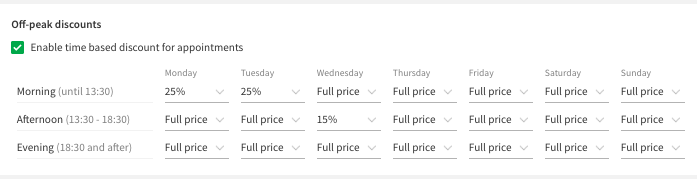
A table will appear with the days you are open, split into morning, afternoon and evening.
Select the day and time of day you wish to apply a discount to, as well as the percentage you wish to discount by.
To apply the discount to your services:
After creating your discount, you'll need to decide which services to apply the discount to.
At the top of the pop-up box, click on the tab "Assigned services".
Check the box next to each service for which you want to apply this discount.
Click "Save".
We've set default times for morning, afternoon and evening but you can easily change the time slots by going to Settings and then “Online booking”.
Was this article helpful?