
You and your team can set up a variety of notifications to help you stay up to date with any changes in your calendar.
Push notifications
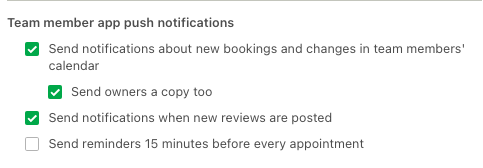
Push notifications are the quickest way to stay up to speed with changes on the go; you can check them from your device lock screen, tap them for more information, or leave them to check at a more convenient time.
Better yet, you can control whether your team are notified only about their own bookings or the full team by managing their permissions.
As the salon owner, you can decide if you receive a copy of all notifications or not.
Just make sure you each have the Connect app downloaded, and push notifications turned on.
Notifications in Connect
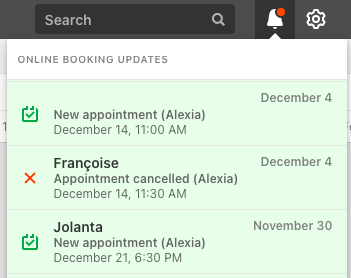
You can check all recent activity from the bell icon in the top right corner of Connect. Here you can see when a customer:
Books with you
Reschedules their booking
Cancels their booking
As well as other useful information like when your invoice is issued or if you have an outstanding balance to pay.
Email notifications
We'll always send you an email to let you know when a customer:
Books with you
Reschedules their booking
Cancels their booking
To set which email address we send these emails to:
Go to Connect on a desktop
Go to settings and then "notifications" on the left
Click "Contacting You" at the top of the page
Enter the email address into the first box on the page. You can also add a secondary address and we'll send a copy there, too.
Was this article helpful?