
Here’s a quick guide to understanding what’s on your Treatwell invoice and how it connects to your payouts.
What is included in the Account Summary?
The first page of the invoice is divided into two parts:
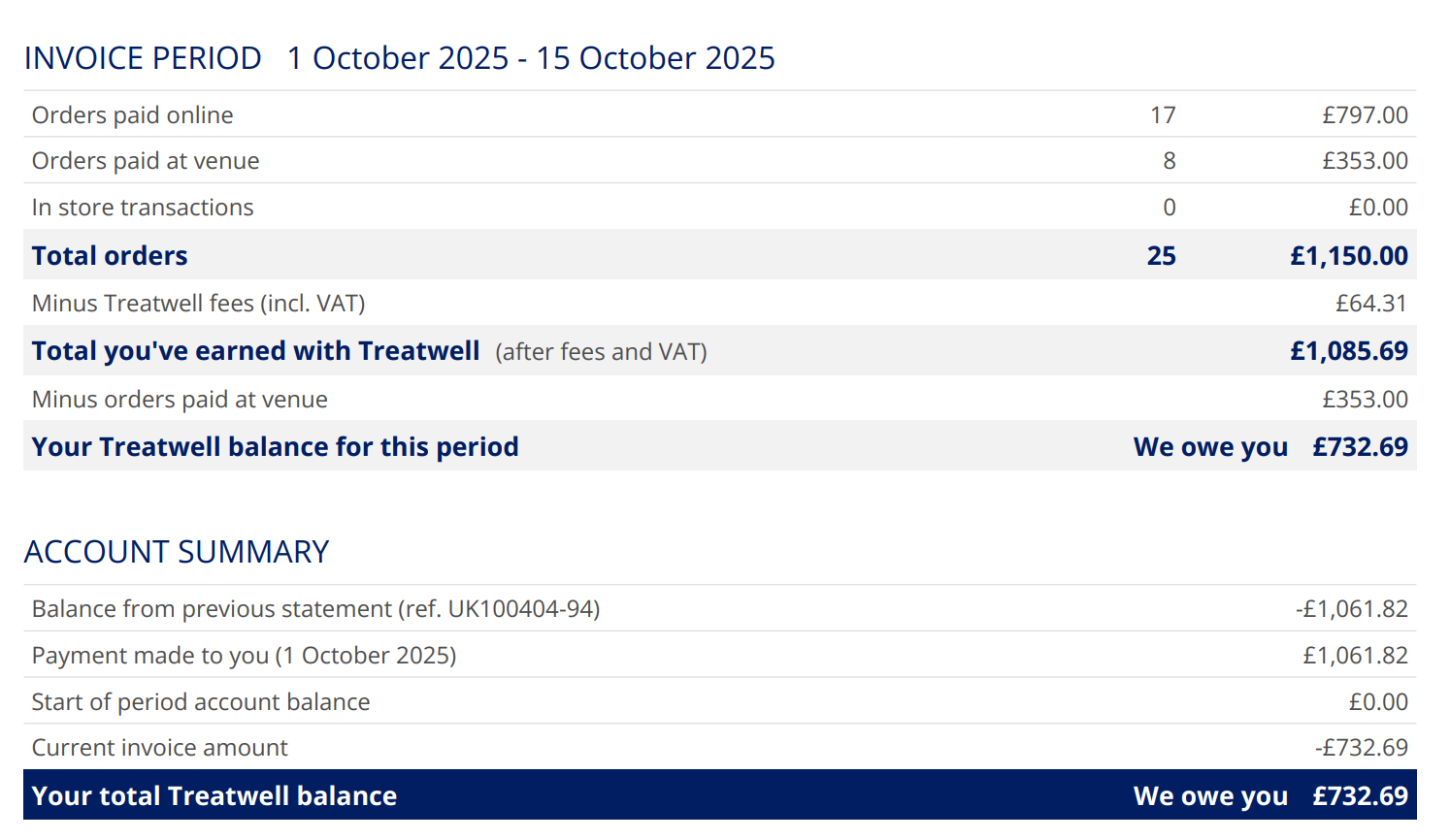
Part 1 (invoice period calculation): The amounts here calculate the balance for the invoice period, which is then included in the final Account Summary.
Invoice period: This states the dates the invoice covers.
Orders paid online: The total value of bookings your clients paid for online through Treatwell.
Orders paid at venue: The total value of bookings your clients paid for directly in the salon.
In-store transactions: Any sales recorded through your Treatwell POS system (e.g. Tap to Pay).
= Total orders: The total value of all bookings in this invoice period.
Minus Treatwell fees (incl. VAT): The total Treatwell fees, commissions, and VAT charged for the period. This includes the Treatwell subscription fee, Tap to Pay fees, commission for new clients and processing fees for online payments.
= Total you’ve earned with Treatwell (after fees and VAT): Your total earnings after Treatwell fees have been deducted.
Minus orders paid at venue: The value of orders your clients paid directly to you in-salon. This amount is subtracted because you already received it from the client.
= Your Treatwell balance for this period: Your Treatwell balance for this period: This shows whether Treatwell owes you or you owe Treatwell for this specific period. It’s an intermediate balance that’s later combined with previous payments or carryovers to calculate the total shown in the Account Summary.
Part 2 (Final balance summary/Account summary): The amounts here calculate your current balance with Treatwell, which includes any balances from previous statements and current balance from the invoice period.
Balance from previous statement: Any remaining balance from your last invoice (positive or negative).
Payment/s made to you: Any previous payout you already received before this invoice. This can have multiple payments depending on your payout frequency.
Payment/s you made: Any previous payments you have already paid us.
= Start of period account balance: Your starting balance for this period, after the last payout or adjustment.
Current invoice amount: The total balance for the invoice period (“Your Treatwell balance for this period”.
= Your total Treatwell balance: The final figure that shows whether you’ll get paid or need to pay.
“We owe you” = Treatwell will pay you.
“You owe us” = you’ll need to pay this balance.
What's included in the Invoice Statement?
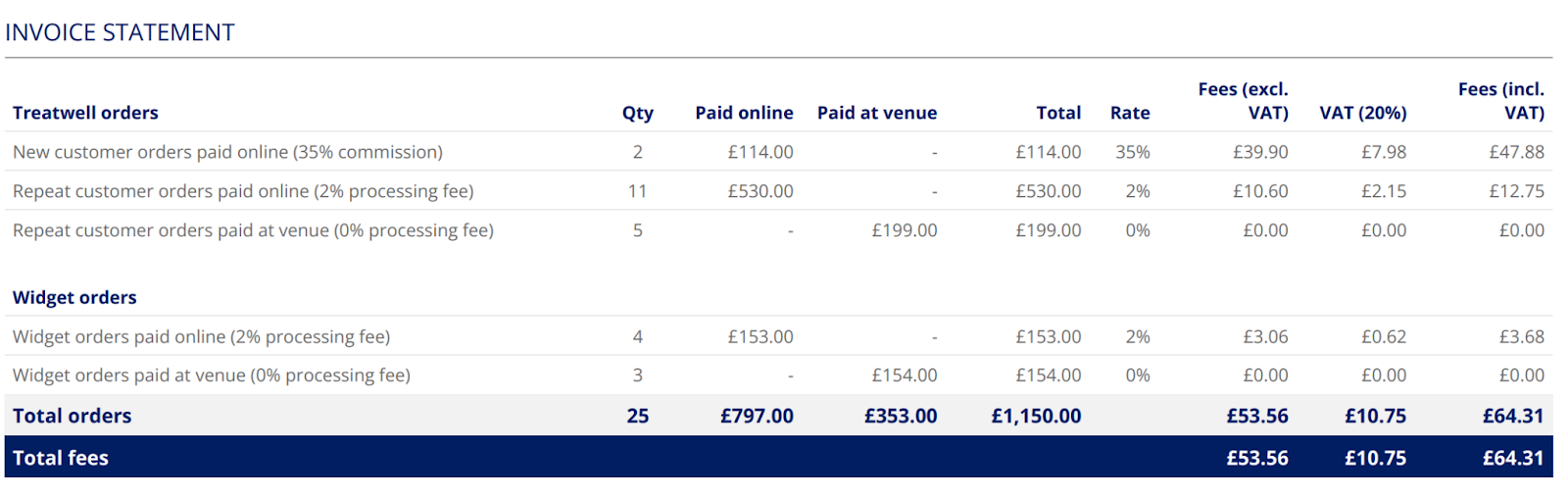
The Invoice Statement (second page) groups your orders by type so you can see what rates and fees applied.
New customer orders paid online: New clients who paid online; a commission applies.
New customer orders paid at venue: New clients who paid you in salon; a commission applies.
Repeat customer orders paid online: Repeat clients who paid online; a small processing fee applies.
Repeat customer orders paid at venue: Repeat clients who paid you in-salon.
Widget orders paid online or at venue: Bookings via your website widget, showing the payment method.
Each order type includes:
Qty (quantity): How many orders of that type you had.
Paid online / Paid at venue: The value of bookings by payment method.
Rate: The commission or processing fee rate.
Fees (excl. VAT): Treatwell’s fee before VAT.
VAT (20%): The VAT charged on Treatwell’s fees (commission or processing fee).
Fees (incl. VAT): The total fee with VAT included, this is what’s deducted from your earnings.
What is included in the full breakdown of the invoice?
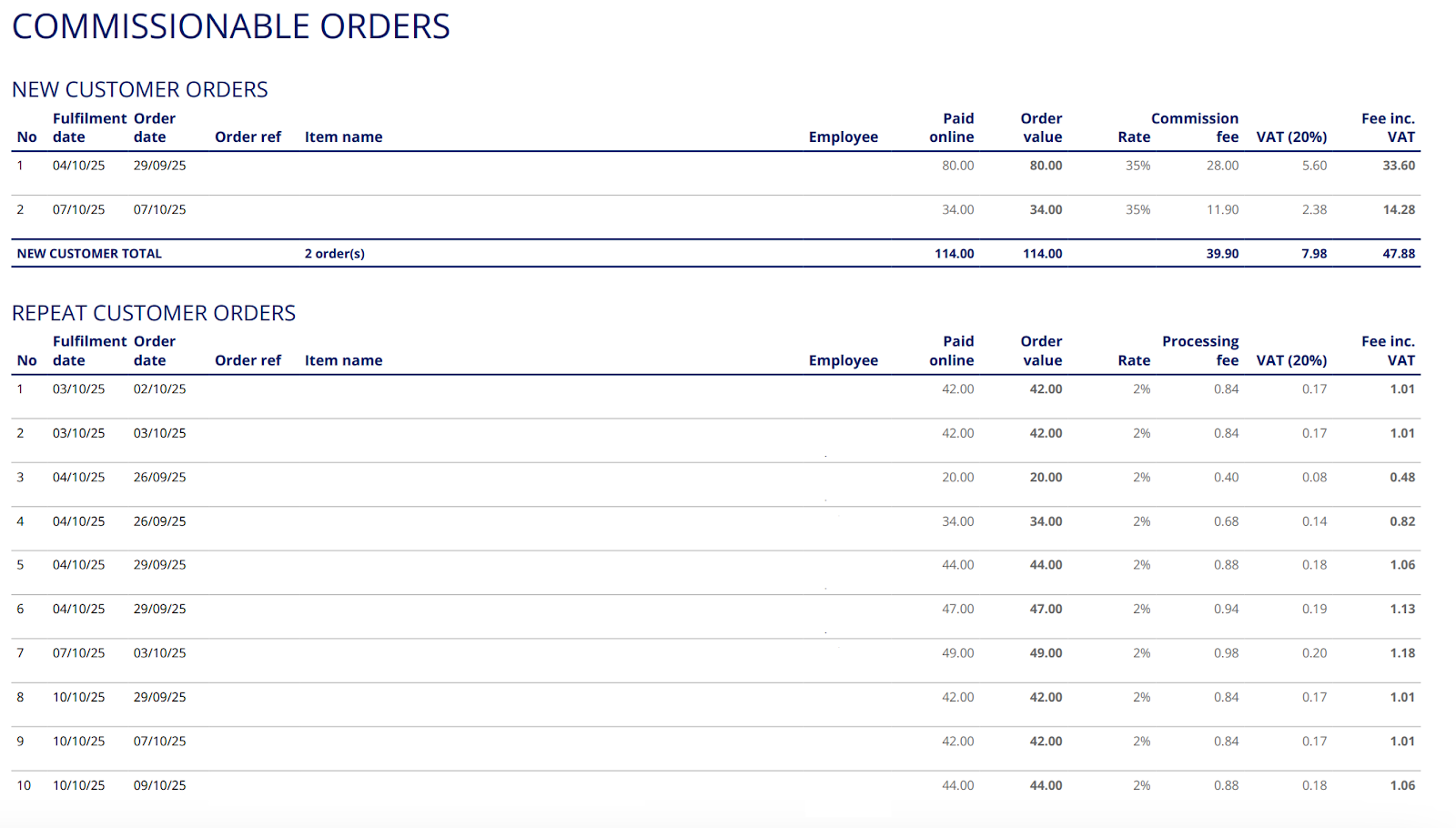
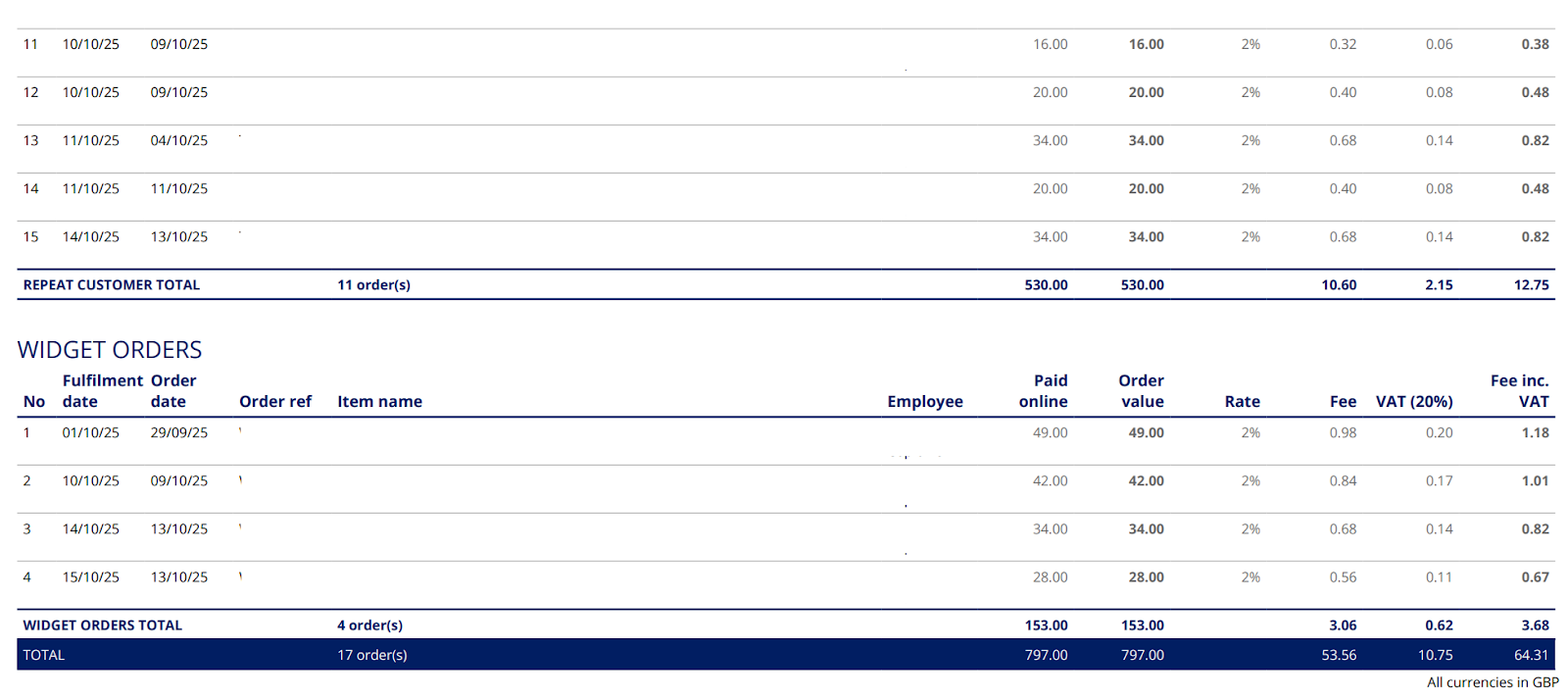
The full breakdown (from page three) lists every booking that makes up your totals, one line per order. It’s split into Commissionable and Non-commissionable sections.
Commissionable orders
Bookings where a Treatwell fee applies:
New client commission for new customers.
Online processing fee for repeat customers who paid online.
Each line shows:
Fulfilment date: When the appointment took place.
Order date: When the appointment was booked.
Order reference: Reference number of the appointment.
Item name: Service performed.
Employee: Team member who carried out the service.
Paid online / Paid at venue: How the client paid.
Order value: Price of the service.
Rate: Percentage that applies (commission or processing).
Fee (excl. VAT): Our fee before VAT.
VAT (20%): VAT applied on our fee (commission or processing).
Fee (incl. VAT): Total fee including VAT; this is the amount deducted on the invoice.
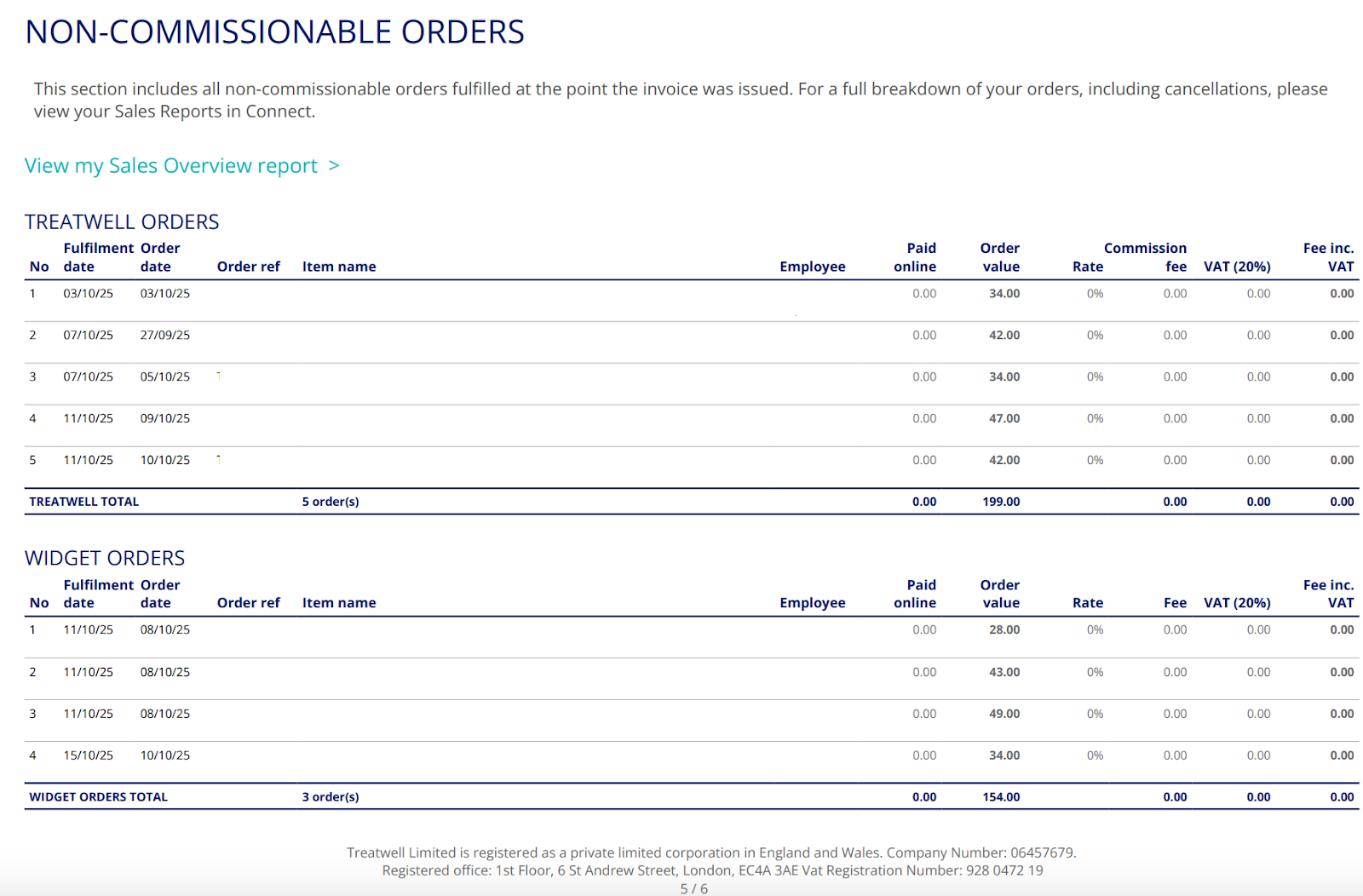
Non-commissionable orders
Bookings shown for record-keeping where no Treatwell fee applies:
Repeat clients paid at the venue: You collected full payment; no Treatwell commission.
Widget orders at 0% rate: If applicable for venue-paid widget orders.
For these lines, you’ll see:
Rate: 0%
Fee: £0.00
VAT: £0.00
The order value is shown only for reference.
Was this article helpful?