
The notifications that we send you about new bookings are a quick way to check some details about the booking at a glance.
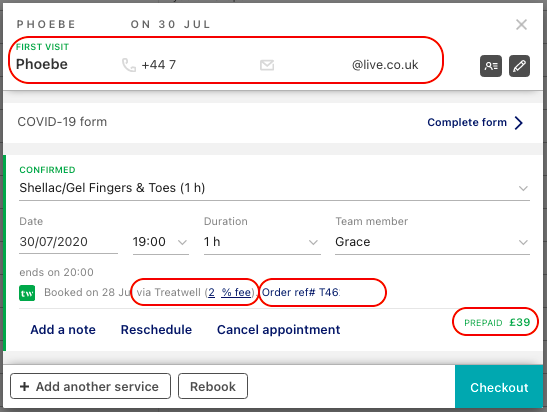
The customer's contact details
You'll find the name, phone number and email address of the customer:
At the top of the appointment card in Connect
In the booking confirmation email we sent to you
In their client card in the Client List
Which payment method the customer has chosen
So that you know whether to collect payment from the customer, you can check their payment method:
By hovering your mouse over the appointment in your calendar
On the appointment card in Connect (above the "checkout" button)
In the confirmation email we sent to you
The order reference number for Treatwell, widget and Reserve with Google bookings
If you need to contact us about an order, we'll need the reference number. Find this:
On the appointment card in Connect (below the appointment date and time)
In the confirmation email we sent to you
What commissions or fees you're being charged
So that you can keep a track of your finances, we clearly state our commissions and fees:
On the appointment card in Connect (below the appointment date and time)
In the confirmation email we sent to you
In the invoice that is sent to you as part of our billing cycle
The customer's booking history with you
The customer's full booking history, including cancelled orders, can be accessed:
By clicking their name from the appointment card in Connect
By searching for their name in your Client List
In your list of bookings (just go to Reports and then Bookings)
Was this article helpful?